Maestro Flow: a developer canvas that keeps agent-built work legible

Summarize:
In public preview: design in VS Code or Studio Web, build alongside Claude Code or Codex, and run on an engine that already carries our customers’ production processes.
UiPath Maestro™ is our orchestration runtime, the control plane that runs long-lived business processes across existing enterprise systems, automations, agents, and people, while holding the state and the audit record. Maestro has always modeled those processes in BPMN, where the diagram process owners read is the same thing the runtime executes. Maestro Flow is a new canvas on the same runtime, for developers who would rather not model in BPMN.
Try these delights in the current public preview:
One artifact for the whole process: control flow, agentic reasoning, document processing, enterprise system integration, Data Fabric access, human decisions, and the automations you have already built.
Build where you love: design in VS Code or Studio Web; use Claude Code, Codex, or whatever coding agent you already run.
A quick inner loop: generate a node’s data from one prompt, pin its output shape, run a single node, and probe any value live while the flow runs. Progressively build your flow.
Apply the rigor of agentic evaluations to your whole process end-to-end, not just one agent.
Underneath all of it sits the Maestro control plane, providing the durability, governance, and audit trail that already carries our customers’ production processes.
Two parts of this matter deeply to us: a design canvas that is a pleasure to work in, running on an orchestration runtime that holds up in production.
You describe and guide. Your coding agent does the rest.
While Maestro Flow has a great design canvas, we built it assuming you may start by describing what you want to a coding agent.
Point your coding agent at an empty folder and describe what you want. It will ask you what it needs to know, and then the UiPath skills and CLI empower your coding agent to build a real project on your machine, creating the .flow file and surrounding solution, and walking you through how to create Integration Service connections as needed. You don’t get a skeleton to finish by hand; you get the whole Flow project. And if you are adding a Flow to an existing solution, the agent knows how to fit it into the larger context. The skills provide the instructions your agent reads to get this right: node conventions, where things go, and a validator that checks the result against the schema before you ever run it.
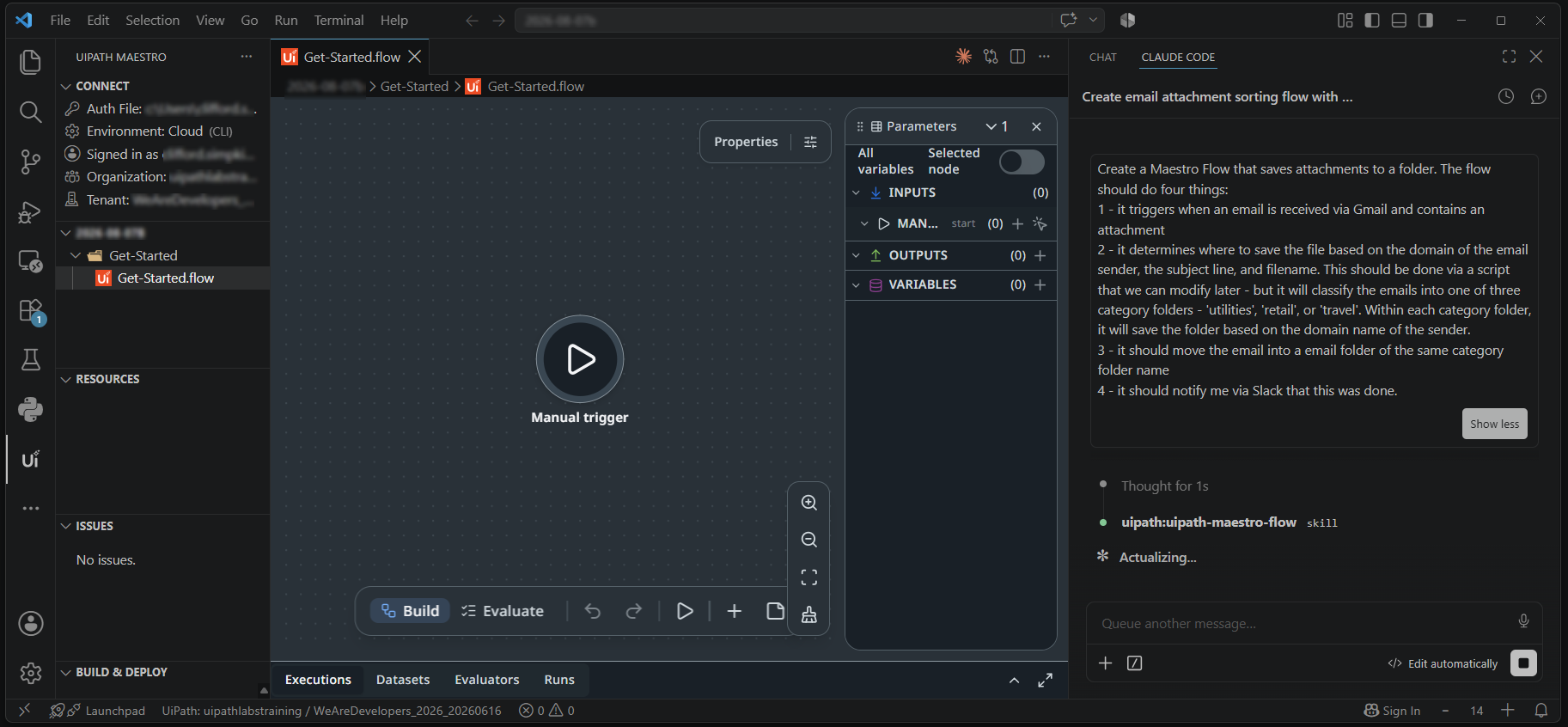
Even better, your agent stays involved after the first version—as you adjust the flow nodes by hand, your coding agent works from your edits rather than around them. You are not choosing between generating and building; you are doing both against one artifact. Your coding agent uses the CLI to help you plan, build, deploy, diagnose failed runs, and manage what is already running. And because Flow serializes as JSON, you review your changes and your teammates’ through Git, like any other code.
One artifact, every actor
Real work doesn’t live inside a single agent. It moves across reasoning, documents, data stores, the systems of record in between, and the humans making decisions. Flow brings these actors together into one place—in a connected process.
To illustrate what this means, consider an invoice review process. When an email arrives with an attachment, a node extracts the line items and metadata from the document; a lookup compares the data against the purchase order; and an agent reads both and then has to consider whether an identified $283.50 line-item mismatch is due to freight, a partial shipment, or an error. The agent then compares its findings against your business rules to decide whether it needs a human to approve that mismatch or if it should send the invoice on for payment using a process your team implemented four years ago. Through this process, you get one trace and one record of what was decided by whom and why. Six kinds of work, and none of them left the canvas—no glue code between them, no separate builder for the agent, no second project for document processing, and no leaving the canvas to review an approval while you build.
And this isn’t the limit of what a flow can do. Triggers, scripting, decisions, looping, and sub-flows are all there. Agents can be configured in the flow itself, with their tools, context, escalations, prompts, and output schema inline, so there is no separate builder to jump to and no second artifact to keep in sync. And flows can use connectors to reach the systems you already run (from Google to Microsoft to SAP) and can call other artifacts your team has already built on UiPath, including robots, API workflows, and other Maestro processes—just drop them onto the canvas as nodes and you’re set. Your nodes can even call agents or automations that are hosted and run outside of the UiPath Platform.
Maestro Flow adds an intuitive, AI-native design canvas to UiPath’s production-grade orchestration engine—yielding one artifact with one lifecycle that crosses design-time and runtime.
Fast to build, easy to follow
Flow is designed to tighten your inner loop, accelerating your time to production with a designer that elevates the developer experience. And almost anything you can do on this canvas, your coding agent can do from your terminal. Here are three of my favorite canvas capabilities, in the order you tend to meet them.
IntelliSense with node-level simulations
The canvas knows what is in scope at every point in your flow. Select a node and the variables list shows only the outputs it can reach, because nothing downstream has produced anything yet. That awareness is what lets the rest work: pin a node’s output shape with output mocking and everything downstream infers its types, so you get IntelliSense across the whole chain before the flow has ever run. You can also run a single node against its current context to check one step at a time, rather than debugging the whole workflow to test the piece you just changed.

Live probes to see just what you want as the process runs
Right-click a node, attach a probe, and you can view its live value on the canvas while the flow runs, including inside a Loop, iteration by iteration. Probes can list values like $self.output or take expressions, so when an Outlook or Slack node returns a large object or collection you can write $vars.extractInvoice.output.lineItems.map(i => i.sku) and watch only the field you care about. And when you want to be sure rather than confident, evaluations work like agent evals one level up: define a dataset, mock any node so it returns something fixed, and score the run. Test cases for your orchestration.

Autopilot fills in the boring parts
Nearly every structured input or script window has a small wand button that calls Autopilot. Ask for code that completes a specific task or that cleans up a script error, and Autopilot writes it. That same button will build an agent system prompt or mock output data. It runs straight through the platform’s model gateway, so it comes back fast.

And there are other nifty delighters around the design canvas, including…
Arrange the designer’s property panels how you like and save the layout
Use the ‘tidy up’ option to clean up complicated workflows, either the whole thing or only the nodes you selected
Drag a variable name or value from the node’s Input pane and drop it into a native node’s property dialog
Leave colored sticky notes to explain the flow, with support for inline images and video coming soon
The orchestration runtime you don’t have to build
While the canvas is the half you feel, Maestro provides the half you don’t have to think about—all of the work that you would otherwise be doing yourself. Here are three things that Maestro handles so you don’t have to.
It keeps running when something fails
Maestro’s durable execution runs on the open-source Temporal.io engine, so retries, compensation, and replay are natively supported. A flow that fails at step nine will resume at step nine rather than starting from the top, and you can live migrate running instances to newer versions without losing any progress. You don’t have to write a state machine, and you don’t have to build the part that survives a machine failing underneath it, or a system it depends upon going away.
Enterprise guardrails right on canvas
Enable guardrails on Agent nodes in a flow and it will screen for personally identifiable information (PII) and prompt injection against the policies your organization has already set centrally. Access the full depth of Agent Builder in UiPath Studio inline as you build your flow. You don’t write the PII scanner, and you don’t write the injection filter.
Visibility that spans all layers
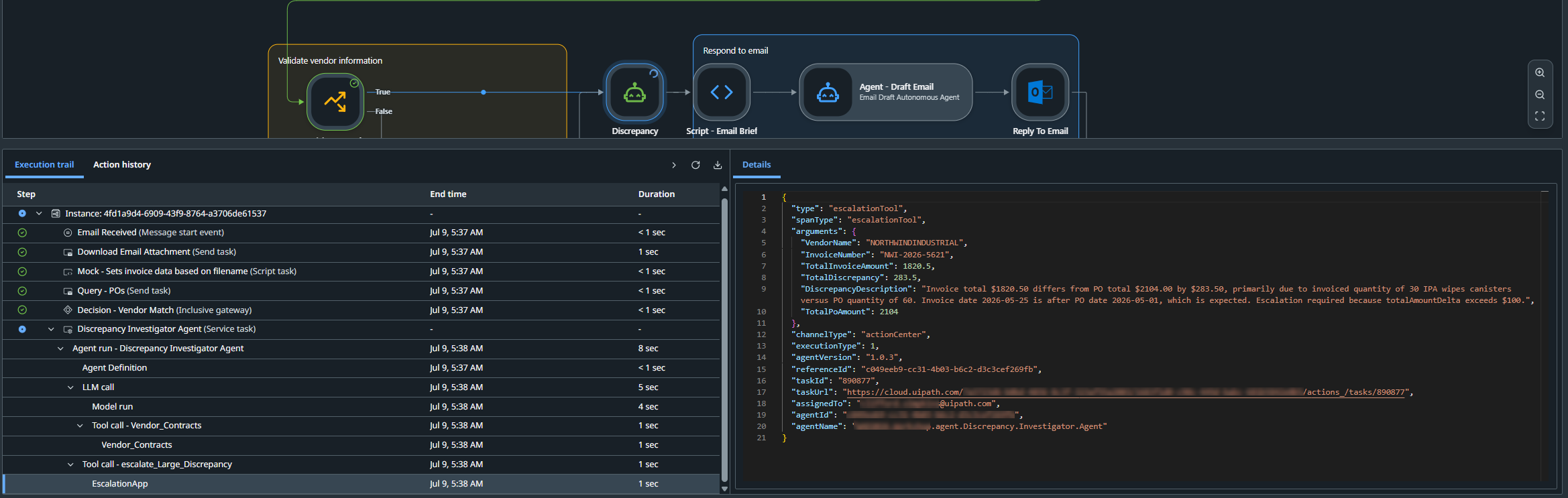
Probes show you what happened while you are building the flow. In production, the trace does the same job on a different scale: one job has one trace across every actor. It’s all tracked—every path the flow takes, every call an agent made, which grounding index it consulted and when, the platform components underneath, and the HTTP requests and human approvals in between—it’s all there on one timeline. There is no guessing how a process ran or why an agent decided what it decided.
Where this goes
As coding agents continue to improve, more of what runs in your business will be written by something other than a person. While that’s a good thing, it also changes how you review and govern production processes that span agents, documents, systems, and people.
We believe process generation and comprehension must scale together. Most of the industry is currently solving for the first. Flow is built to keep them in balance: a canvas that keeps agent-built work legible, running on an orchestration runtime that can audit every step and invoke agents in a controlled context.
Maestro Flow has been in public preview for a while, and we have been shaping it around your feedback the whole time. General availability is coming soon. The preview is what you can pick up today.
Start here: install the UiPath extension for VS Code, create a new solution, and tell your coding agent what you want to build.

Deputy CTO, UiPath
Related articles


Get articles from automation experts in your inbox
Sign up today and we'll email you the newest articles every week.
Thank you for subscribing!
Thank you for subscribing! Each week, we'll send the best automation blog posts straight to your inbox.
Get articles from automation experts in your inbox
Sign up today and we'll email you the newest articles every week.
Thank you for subscribing!
Thank you for subscribing! Each week, we'll send the best automation blog posts straight to your inbox.